
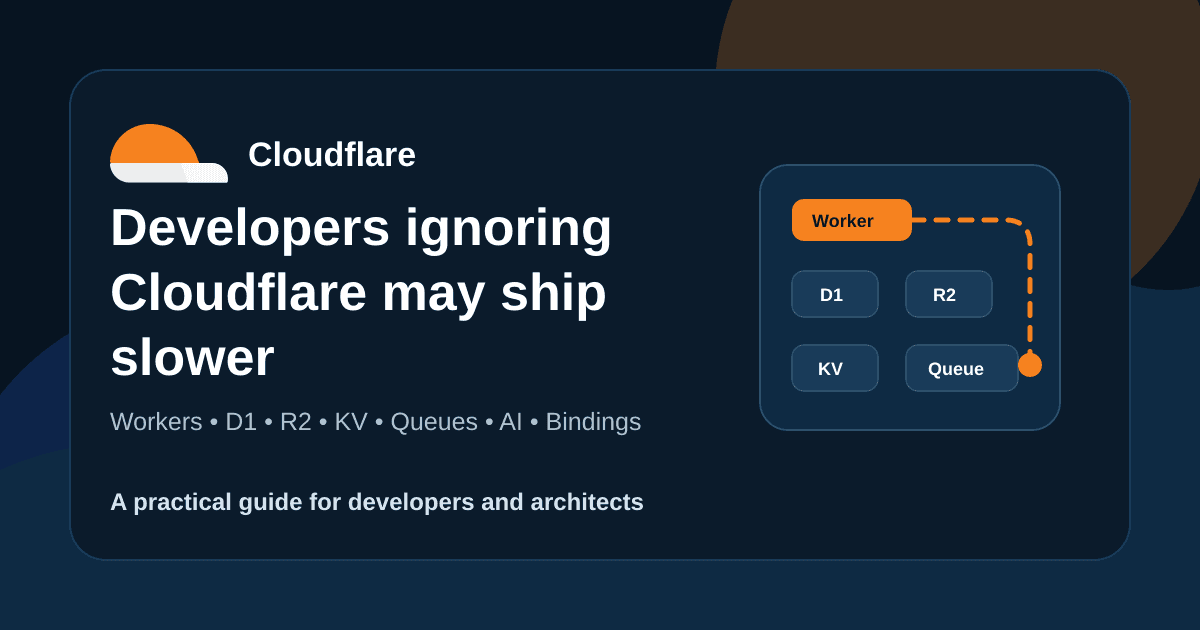
Many developers still think Cloudflare is only DNS, CDN, SSL, and website protection. That view is now outdated. Cloudflare can also run APIs, databases, queues, file storage, AI tools, and webhook systems with much less infrastructure work.
This does not mean Cloudflare should replace AWS, Azure, GCP, or a VPS in every project. It should not. But for many client portals, internal tools, micro SaaS products, webhooks, and automation backends, Cloudflare can help developers ship faster with fewer moving parts.
The practical question
Do not ask only, “Is Cloudflare better than AWS?” Ask this: which parts of this system can be built faster, safer, and simpler on Cloudflare? That is where the platform becomes useful.
What changed with Cloudflare
Earlier, Cloudflare mostly sat in front of your application. Your app ran on AWS, a VPS, Vercel, Netlify, shared hosting, or a client server. Cloudflare protected it and made it faster.
Now, Cloudflare can run a large part of the application itself. Workers can handle backend logic. D1 can store relational data. R2 can store files. Queues can process slow work. Workers AI can add AI features. Hyperdrive can connect to an existing database.
The biggest benefit is not only speed. The bigger benefit is reduced infrastructure work.
The real power is bindings
A binding connects your Worker directly to another Cloudflare service. Your Worker can access D1, R2, KV, Queues, AI, and other services through env without placing dangerous service keys inside source code.
const result = await env.DB.prepare(
  "SELECT id, name, email FROM customers LIMIT 10"
).all();
In a normal backend, developers often manage database URLs, usernames, passwords, staging secrets, production secrets, CI secrets, and local machine secrets. Bindings reduce that mess.
Where this stack fits best
Cloudflare is a good fit when the app is mostly API, storage, webhooks, files, queues, and lightweight database work.
Client portals and small SaaS dashboards
Webhook handlers for payments, WhatsApp, SMS, Meta, Shopify, or GitHub
Invoice upload, file sharing, and document delivery systems
Lead capture APIs with follow-up automation
Internal tools where companies want less server maintenance
AI utility apps with clear cost limits and human review
Practical architecture example
Suppose a company is building an invoice delivery system. It needs admin login, customer records, PDF upload, public invoice link, WhatsApp or email sending, delivery logs, and maybe AI summary later.
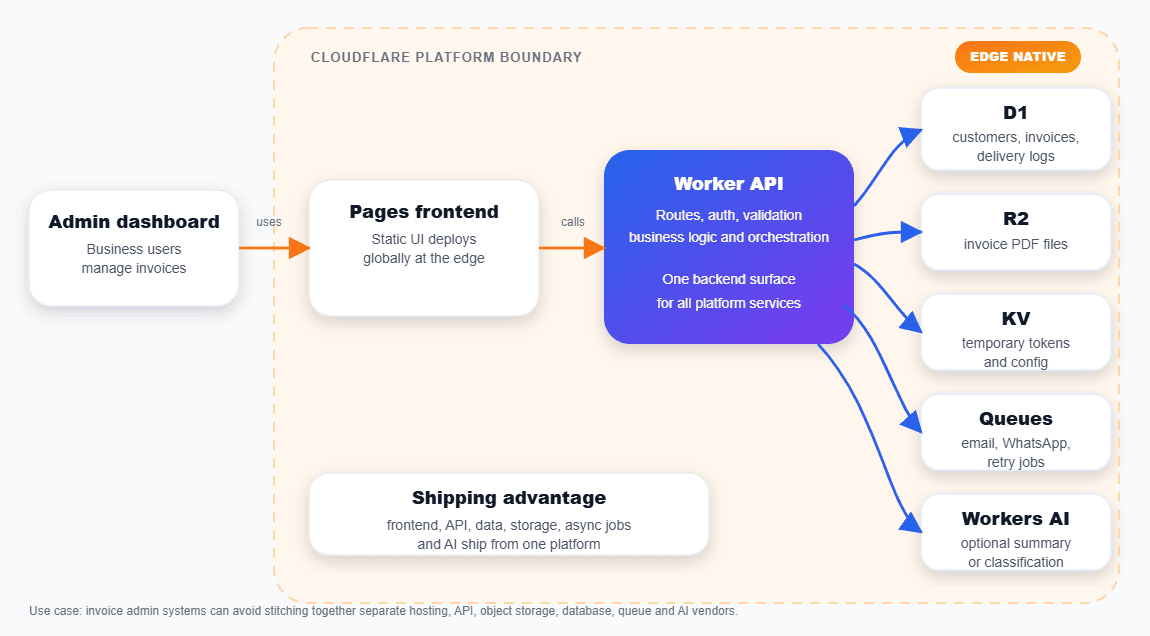
This is not just a demo stack. If designed carefully, this can run a real business workflow for restaurants, distributors, clinics, agencies, and service providers.
Recommended starting stack
Workers
API routes, webhooks, auth checks, and business logic
D1
SQL data such as customers, invoices, logs, and settings
R2
Files such as PDFs, images, reports, and exports
KV
Temporary tokens, config, cache, and light lookup data
Queues
Email, WhatsApp, retries, PDFs, reports, and AI jobs
Workers AI
Summaries, classification, extraction, and internal AI tools
Hyperdrive
Safer access to existing PostgreSQL or MySQL databases
Start with Workers, D1, R2 if files are needed, Wrangler, and proper logs. Add KV, Queues, AI, or Hyperdrive only when the feature needs them.
Step 1: create the Worker project
npm create cloudflare@latest invoice-api
cd invoice-api
npm install
npx wrangler d1 create invoice_db
npx wrangler types
A clean wrangler.jsonc should define bindings for the services the Worker needs. Do not hardcode Cloudflare service keys.
{
  "name": "invoice-api",
  "main": "src/index.ts",
  "compatibility_date": "2026-06-10",
  "compatibility_flags": ["nodejs_compat"],
  "observability": {
    "enabled": true,
    "head_sampling_rate": 1
  },
  "d1_databases": [
    {
      "binding": "DB",
      "database_name": "invoice_db",
      "database_id": "replace-with-real-id"
    }
  ],
  "r2_buckets": [
    {
      "binding": "INVOICE_FILES",
      "bucket_name": "invoice-files"
    }
  ]
}
Step 2: keep the API small first
Start with one real business flow. For the invoice example, a health check and invoice list are enough for the first pass.
export default {
  async fetch(request: Request, env: Env) {
    const url = new URL(request.url);

    if (request.method === "GET" && url.pathname === "/health") {
      return Response.json({ ok: true, service: "invoice-api" });
    }

    if (request.method === "GET" && url.pathname === "/invoices") {
      const result = await env.DB.prepare(
        "SELECT id, invoice_number, amount, status FROM invoices ORDER BY created_at DESC LIMIT 50"
      ).all();

      return Response.json({ invoices: result.results });
    }

    return Response.json({ error: "Not found" }, { status: 404 });
  }
};
This pattern is simple: Worker receives the request, uses D1 through the binding, and returns JSON. No separate backend server is required for this kind of flow.
Step 3: store files safely in R2
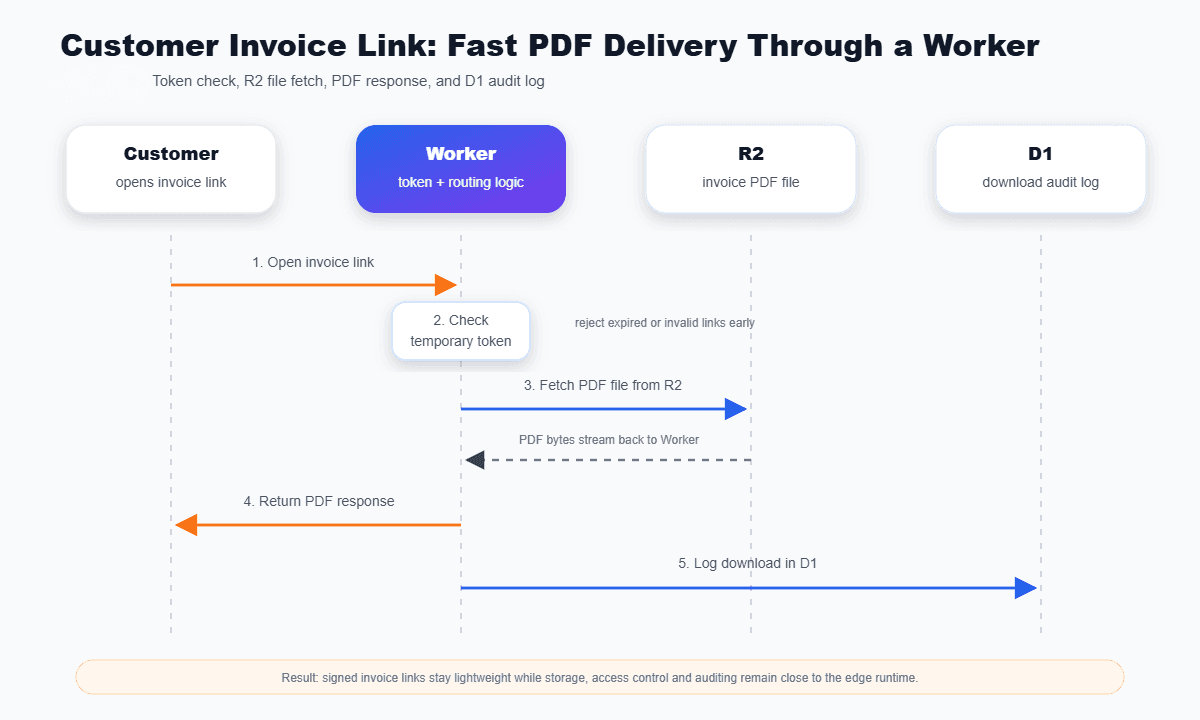
For invoice PDFs, reports, and documents, use R2. Do not make the bucket public by default. A safer pattern is to route access through the Worker.
Step 4: move slow work to Queues
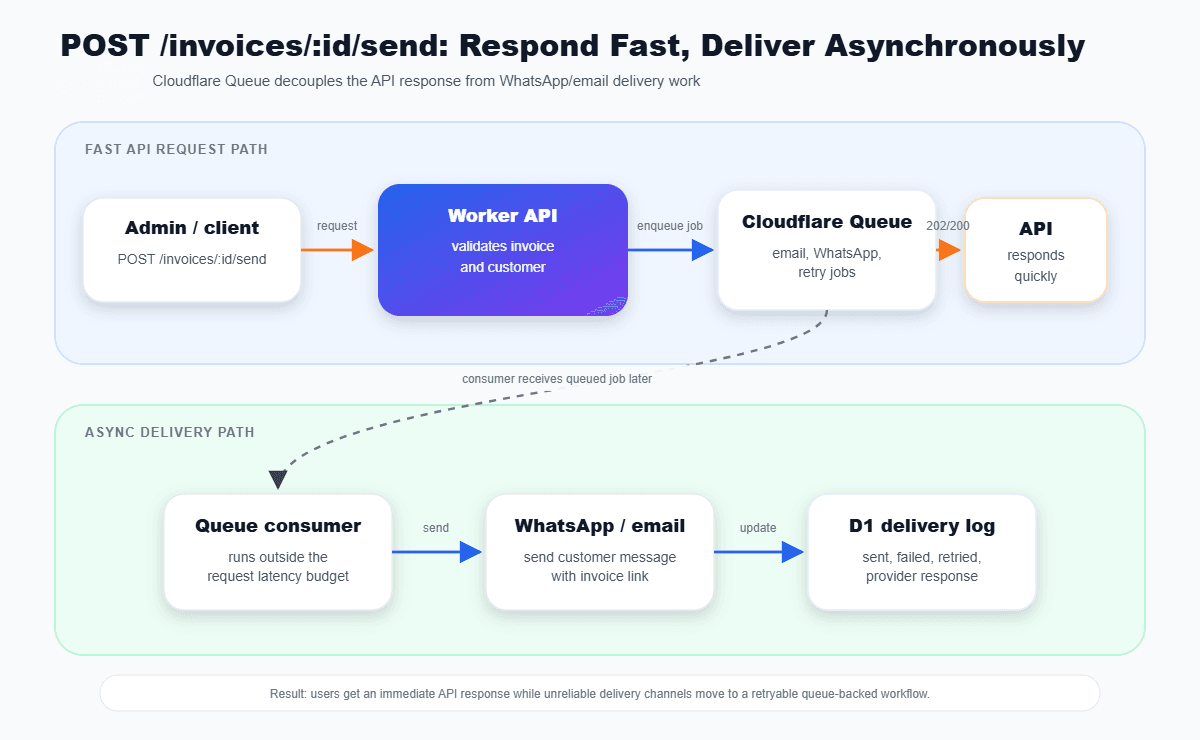
Sending WhatsApp messages, emails, PDFs, reports, and AI jobs should not block the user request when the user does not need to wait for the result.
Add AI only where it helps
Cloudflare makes AI easier to access, but that does not mean every app needs AI. Use it for summary, classification, extraction, internal search, and draft generation. Avoid AI for sensitive decisions unless there is human review and audit logging.
Before adding AI, define what data is sent, who can trigger it, the monthly cost limit, what happens if it fails, and which logs are needed for debugging.
Where Cloudflare is strong
Cloudflare is strong for webhooks, small APIs, internal tools, file workflows, and background jobs. Workers are especially good for public webhook endpoints because they are fast, easy to deploy, and simple to place behind Cloudflare security controls.
This fits payment callbacks, WhatsApp Cloud API callbacks, Meta lead form webhooks, Shopify events, GitHub webhooks, SMS delivery callbacks, and email inbound routes.
Where Cloudflare can hurt
Deep lock-in if every service is built directly around Cloudflare-only APIs.
D1 is useful, but it is not a full PostgreSQL replacement for heavy workloads.
Browser rendering can become costly if it runs inside every user request.
Some native Node.js packages will not work in the Workers runtime.
R2 file access patterns should be tested instead of assumed to be fast enough.
Production checklist
Project ideas developers can build
WhatsApp invoice delivery backend
Worker API, D1 records, R2 invoice PDFs, Queue based sending, and temporary public links through KV.
Lead capture and follow-up system
Form endpoint, D1 lead store, Queue based email or WhatsApp follow-up, and a Pages dashboard.
AI support email classifier
Email Worker, D1 tickets, Workers AI classification, R2 attachments, and Queue based notifications.
Webhook relay and audit system
Worker ingestion, D1 event logs, Queue retries, and R2 archive for large payloads.
Final recommendation
Cloudflare should be part of a modern developer's architecture toolkit. Not for every project, but definitely for micro SaaS apps, internal tools, client portals, webhook systems, file based workflows, edge APIs, AI utility apps, and automation backends.
The benefit is simple: fewer servers, fewer exposed secrets, faster deploys, less DevOps work, and enough scale for many real business systems.
Do not follow hype. Also do not ignore the shift. Start with one internal tool, build it properly, measure the limits, and then decide where Cloudflare fits in the larger architecture.